

Smart lighting lets you control your home’s LED bulbs straight from your phone using an app. You can turn lights on or off, dim them, change colors, and set schedules, all without touching a switch. Most bulbs connect through Wi-Fi or Bluetooth, and setup usually takes less than ten minutes per bulb.
What Smart Lighting Actually Means
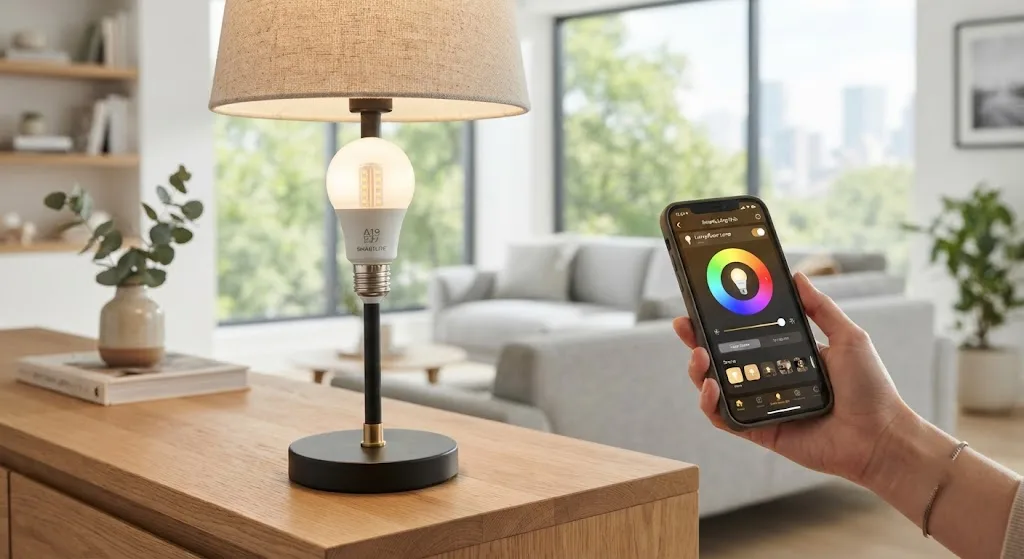
Smart lighting is any light bulb, switch, or fixture you can control through an app, a voice assistant, or an automated schedule. Instead of walking to a switch, you tap a button on your phone. The light responds right away.
Most smart bulbs are LEDs with a small chip built inside. That chip connects to your home network. Once it’s online, the bulb listens for commands from an app on your phone or tablet. You can turn it on, turn it off, dim it, or change its color, all from wherever you’re standing.
This isn’t a niche gadget anymore. Smart bulbs let you control your lights from your phone, set schedules, and even change colors. Prices have dropped, and the technology has gotten a lot more reliable over the past few years.
How Your Phone Talks to Your Lights
Your phone doesn’t talk to the bulb by magic. It uses one of two main paths: Wi-Fi or Bluetooth. Some setups add a third option, a hub, which acts as a translator between your phone and the bulbs.
Wi-Fi bulbs connect directly to your home network. That means your phone can control them from anywhere in the house, and often from outside the house too, as long as you have an internet connection. Setup is usually simple. You screw in the bulb, open the app, and follow a short pairing process.
Bluetooth bulbs connect straight to your phone without going through your router. That keeps things simple, but it limits your range. Bluetooth connectivity limits the range in which you’ll be able to control the light, so it works best for a smaller number of bulbs, ones you don’t need to control when you’re away from home.
Then there’s the hub option. A hub is a small box that plugs into your router and manages your bulbs on its own network, often using a protocol called Zigbee. Zigbee-based systems like Philips Hue require a hub but tend to be more reliable, while Wi-Fi bulbs connect directly but can crowd your home network if you add too many. If you plan to have more than a dozen bulbs, a hub is worth considering. It takes some load off your Wi-Fi router and tends to keep every light responding quickly, even during busy network hours.
Setting Up Your First Smart Bulb
Getting started is easier than most people expect. You screw the bulb into an existing lamp or fixture, just like a regular bulb. Then you download the bulb’s app, create an account, and turn the bulb on.
The app will search for nearby smart devices. Once it finds your bulb, you connect it to your home Wi-Fi network by entering your password inside the app. This part can take a minute or two, especially if your bulb only supports an older 2.4GHz Wi-Fi band instead of the newer 5GHz band most routers use today.
Once connected, you name the bulb. Give it a name that matches where it lives, like “kitchen ceiling” or “bedroom lamp.” This matters more than it sounds like it would, because once you have ten or fifteen bulbs, clear names save you from guessing which one you’re about to turn off.
From there, the app becomes your control center. You can turn the light on or off, adjust brightness with a slider, and if the bulb supports color, pick a shade from a wheel or a preset list.
What You Can Actually Do From the App
Once your lights are connected, the app opens up a lot more than a simple on and off switch. You can build routines that turn lights on at sunset and off at midnight, without you touching your phone once the routine is set.
You can also group bulbs together. Say you have four bulbs in your living room. Instead of adjusting each one separately, you group them so one tap controls all four at once. This makes a real difference when you’re trying to set a mood for movie night or get the whole downstairs lit up quickly.
Color-changing bulbs add another layer. Warm white light around 2700K works well for evenings and relaxing. Cooler light closer to 6500K feels more like daylight and works better for mornings or focused work. Full color RGB bulbs go further, adding entertainment and ambiance modes for things like movie nights or parties.
Some bulbs sync with music, changing color and brightness in time with whatever is playing through your phone. This started as a gaming and party feature, but plenty of people use it just to make dinner or a get-together feel a little more alive.
Voice Control and Automation
Most smart bulbs work with a voice assistant, whether that’s Alexa, Google Assistant, or Apple’s Siri through HomeKit. Once linked, you can say a command out loud instead of picking up your phone. “Turn off the kitchen lights” or “dim the bedroom to 30 percent” both work without you lifting a finger.
Automation takes things a step further. You can set your lights to turn on automatically when you arrive home, based on your phone’s location. You can set them to turn off automatically after everyone’s gone to bed. Motion sensors, when paired with smart bulbs, can turn on a hallway light the moment you walk past it and turn it off a minute after you leave.
None of this requires you to be a tech expert. Most apps walk you through these automations with simple menus. You pick a trigger, like a time of day or a location, then you pick an action, like turning a light on, off, or to a specific brightness.
Choosing the Right Bulbs for Your Home
Not every bulb fits every home the same way. If you just want to test the waters, a basic Wi-Fi bulb without a hub is the easiest starting point. It costs less, sets up in minutes, and doesn’t require extra hardware.
If you’re planning a bigger setup with lights throughout the house, a hub-based system is worth the extra cost. It keeps your network from getting crowded and tends to respond faster once you have a lot of bulbs running at once.
Budget also plays a role. Some budget bulbs deliver over 1,000 lumens with full color options for around eight to ten dollars each, making it affordable to light up an entire room without spending a lot upfront. Premium options cost more but often come with better color accuracy and steadier long-term performance.
Think about what you actually want out of the lights before you buy. If you mostly want convenience, like turning lights off without getting out of bed, a basic bulb does the job. If you want color, music sync, and detailed scenes for entertaining, you’ll want to look at bulbs built specifically for that.
Keeping Your Smart Lighting Running Smoothly
A few small habits keep your lighting setup working well over time. Keep your bulb apps updated, since updates often fix bugs and add new features. Give your router a central spot in your home if you’re relying on Wi-Fi bulbs, since a weak signal in one room can cause a bulb to lag or drop offline.
If a bulb ever stops responding, the first fix is usually the simplest one: turn the power off at the switch for ten seconds, then turn it back on. This resets the bulb’s connection without wiping your saved settings.
Smart lighting isn’t complicated once you get past the first setup. A single bulb can show you how convenient it is to control your home’s lights from your phone, and from there, expanding room by room feels like a natural next step rather than a big project.